Sound Decibel Meter
- 4.7
- Rating
- 10.00M
- Installs
- Free
- Price
 Analysis by App-foxy
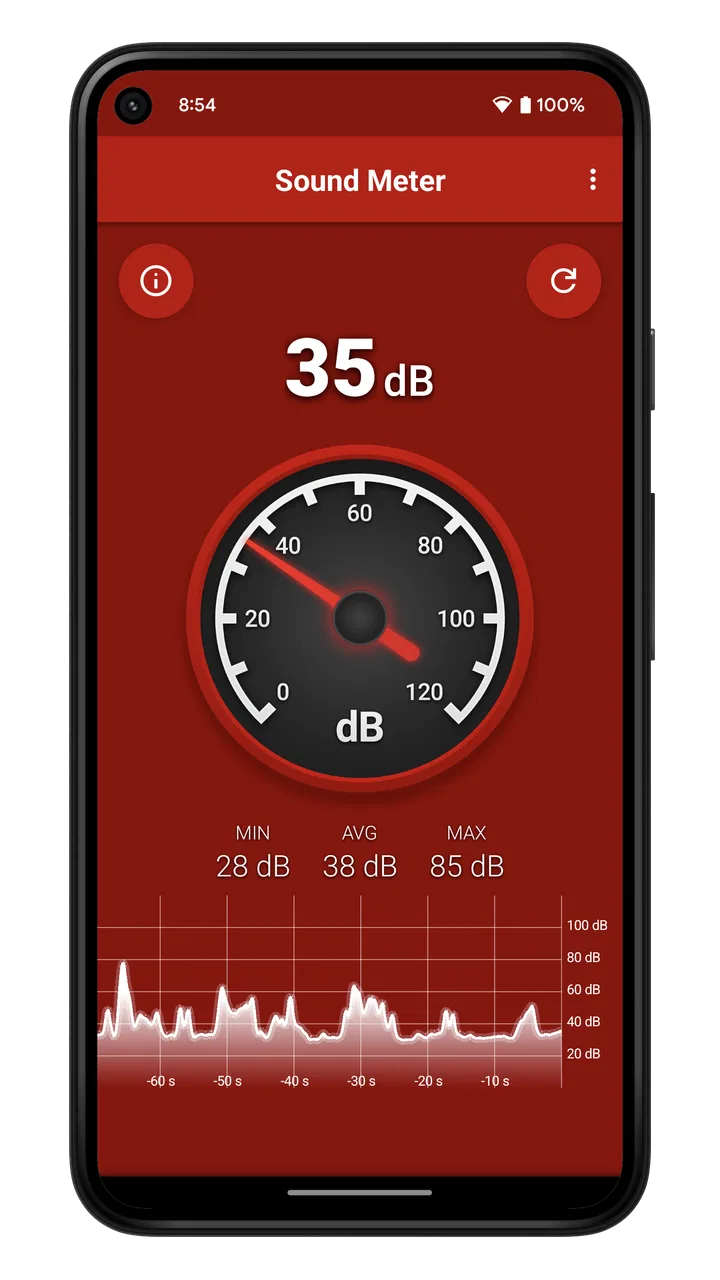
I like simple tools when they do one job clearly, and Sound Decibel Meter fits that idea. This Android music and audio app from Splend Apps turns a phone into a quick sound-level reader, making it useful when I want an immediate sense of how loud a room, appliance, workshop, or street environment feels to the phone’s microphone. It is free to use, aimed at Everyone, and its straightforward design is the main reason I would suggest trying it before looking for a more complicated alternative.
My experience with it is best described as practical rather than scientific. I can open it, give it a moment, and get a live indication of surrounding sound without learning a complicated interface. That makes it handy for everyday comparisons: checking whether a fan is louder than expected, finding the quieter side of a room, or seeing how much background noise changes when a door is closed. It is not a replacement for professional acoustic equipment, but it can still answer many casual questions quickly.
Getting past the first points of friction
The first place users may get stuck is expecting the phone to behave like a calibrated sound meter. A smartphone microphone is designed primarily for calls and recording, not laboratory measurement. Its response can vary by device, case, orientation, and operating conditions. I therefore treat the displayed reading as a useful estimate and comparison tool, not as a formal measurement for health, legal, construction, or workplace decisions.
You May Also Like

 Blood Strike: 2.5 Anniversary
Blood Strike’s Loadouts Turn Every Drop Into a Tactical Gamble
A close look at Blood Strike’s custom loadouts: how fast access to signature weapons reshapes its battle royale rhythm, rewards preparation, and narrows the gap between fights.

 Pandora - Music & Podcasts
Pandora’s Music Is Easy to Start, but Harder to Recover
Pandora’s strength is its low-effort path from a seed to a station. Its weak spot is how much confidence it asks you to place in connection, setup, and quiet recovery.

 8 Ball Pool
 Is Built on Rivalries, Rematches, and Routine
A close look at the rivalries, rematches, shared routines, and unanswered safety questions that turn a quick pool match into a persistent mobile community.

 Samsung Music
’s Quiet Strength Is Playing What You Already Own
Its reach comes less from spectacle than from dependable access to a personal library. That simplicity is both the app’s strongest retention engine and its ceiling.

 AccuWeather: Weather Radar
AccuWeather Review: A Quick, Clear Forecast for Everyday Decisions
For everyday plans, the best forecast is the one you can understand quickly. AccuWeather makes rain timing, radar, and local conditions easy to act on, with a few trade-offs.

 Hill Climb Racing
Why Hill Climb Racing Still Turns Crashes Into One More Run
A tiny car, a bumpy hill and one more upgrade: Hill Climb Racing keeps resurfacing because its simple chaos makes every near-miss feel personal.
More From Our News Desk
View All News


That distinction matters because the app can appear to be wrong when the real issue is the phone itself. Two phones placed beside each other may show different results in the same room. A thick case can partly affect the microphone opening, while holding the device in the hand can introduce handling noise. Even the direction in which the phone faces may change what reaches the microphone. These are not reasons to dismiss the app; they are reasons to use it consistently.
Another common stumbling block is starting a reading in an unstable environment. If I tap the app while walking, touching the phone, talking close to it, or moving it between rooms, the result naturally shifts. For a more useful comparison, I place the phone on a stable surface, keep it in the same position, and wait for the surroundings to settle. The goal is not to chase every changing number but to observe a steady pattern.
The most useful habit is consistency, not false precision. If I want to compare a refrigerator before and after maintenance, I measure from the same distance and angle. If I want to compare two rooms, I use the same phone and similar timing. That approach gives the app a clear practical role even when the absolute value should be viewed cautiously.
Small setup checks that improve the reading
Before blaming the application, I check the basics. The phone should not be pressed against clothing, a cushion, or a tabletop edge that could block the microphone. I also avoid covering the lower edge of the device while holding it. Since phone layouts differ, I simply keep the device unobstructed rather than assuming the microphone is in one particular place.
I also close nearby sources of accidental noise. A finger brushing the case, a notification sound, or speech directly beside the phone can create a brief spike that says more about the setup than the room. When I need a comparison, I take several observations instead of relying on one instant. A single peak is often less informative than the general level that remains for a while.
It is worth checking the operating system requirements before installing. Sound Decibel Meter supports Android six and later, so an older phone may not be suitable. On a compatible device, I still make sure the app is current and that the phone is behaving normally with other audio applications. If the microphone fails in calls or recordings too, the problem is unlikely to be specific to this meter.
The current version is 2.35, and the app has been available since October 30, 2014. That long presence helps explain why it has become familiar to many Android users, but it does not change the basic rule that readings depend heavily on the hardware. I would not choose a phone solely because it produces a particular result in this app.
A sensible first-use routine
My preferred first test is quiet and repeatable. I open the app in a room where I know the sound is fairly steady, place the phone on a surface, and leave it untouched for a short while. Then I create one controlled change, such as turning a fan on or closing a door, and observe whether the reading responds in a consistent direction. This confirms that the microphone and the app are reacting sensibly without pretending that the result is laboratory-grade.
For a distance comparison, I mark the positions mentally or use familiar objects as reference points. I do not move the phone closer for one reading and farther away for another, because distance alone can dominate the result. The same principle applies outdoors: wind against the microphone can distort the reading, so I avoid treating a windy measurement as a clean comparison with an indoor one.
People often ask whether they need special equipment to begin. For casual use, I do not think so. A compatible Android phone and a reasonably quiet starting point are enough to explore the app. Special equipment becomes important only when the result will support a professional decision, a dispute, a medical concern, or a safety judgment. In those cases, I would use an appropriate calibrated instrument and follow the relevant guidance instead.
Recovering a useful workflow when a reading looks wrong
When the display jumps unexpectedly, I restart the process rather than immediately concluding that the app has failed. First I stop touching the phone, move away from obvious noise, and wait for the environment to settle. If the reading remains erratic, I close and reopen the app. I then repeat the test with the phone uncovered and positioned in the same way as before.
This simple reset separates temporary conditions from repeatable behavior. If the app reacts normally after the restart, the original problem may have been handling noise or a sudden sound nearby. If other applications also struggle to record audio, I investigate the phone’s microphone, system settings, or physical condition instead of repeatedly reinstalling the meter.
A useful recovery workflow is to record the context alongside the reading. I note whether a window was open, whether an appliance was running, where the phone was placed, and whether people were speaking. The app itself is most useful when paired with these observations. A number without context can be misleading, while a consistent before-and-after comparison can reveal something genuinely helpful.
For example, imagine I am trying to find a quieter place to work in a shared home. I take a reading at the desk, then repeat it in a nearby room at roughly the same time of day. I keep the phone still in both locations and compare the general pattern rather than one brief peak. If the second room is consistently calmer, I have actionable information. I do not need to claim that the result is an official acoustic survey.
The same method works for checking a noisy appliance. I measure with the appliance off, then with it running, keeping the phone at a fixed position. If the change is repeatable, I know the appliance contributes noticeable sound in that location. I still would not use the app alone to decide whether a machine meets a technical limit, but it can help me decide whether further inspection is worthwhile.
What the app does well compared with usual alternatives
Compared with a dedicated sound meter, this app wins on convenience. I already carry the phone, so there is no separate device to remember, store, or learn. Compared with a generic recording app, it gives the experience a clearer purpose: I can watch the sound environment instead of listening back to a file and guessing how loud it was. Compared with a more elaborate audio-analysis tool, its simplicity makes it faster for quick checks.
That simplicity is also the trade-off. A professional meter is the better choice when calibration, documented accuracy, repeatable technical settings, or formal reporting matters. A recording application may be better when I need to capture the sound itself for later listening. An advanced audio tool may suit someone who wants frequency analysis or production controls. Sound Decibel Meter is strongest in the middle: faster than specialist equipment and more focused than a basic recorder, but not a substitute for either in demanding work.
The app’s rating of 4.7 from around 594 thousand ratings suggests that many people find this basic approach useful. It has passed 10 million installs, which also shows that the idea has broad appeal. I read those figures as evidence of everyday usefulness, not proof that every phone will produce identical readings or that the app is appropriate for professional measurement.
When the phone, room, or expectation is the real problem
Sometimes the app is not the cause of an unsatisfactory result. A room with echoes can make sound appear more variable than expected. A busy street can change from moment to moment. Wind, voices, traffic, and machinery may all create short peaks. If I need a stable comparison, I choose a quieter time and repeat the test rather than treating a changing environment as an app defect.
The phone itself can also be responsible. A damaged or obstructed microphone, an unusual case, or a device with inconsistent audio behavior can undermine any sound meter. I test the microphone with a normal recording or call. If those functions are also poor, I address the hardware or system issue first. If they work normally, I return to positioning and environmental checks.
Another expectation problem concerns distance. Sound does not remain equally strong everywhere in a room, and reflections from walls, floors, and furniture can affect what the microphone receives. I therefore avoid comparing readings taken from arbitrary locations. For a fairer test, I define the question first: am I comparing two desks, checking one appliance from a fixed spot, or observing a room over time? The answer determines where the phone belongs.
People also ask whether the app can prove that a space is safe. I would not make that claim. A phone-based estimate can alert me that an environment seems unusually loud and encourage me to investigate, reduce exposure, move away, or seek suitable advice. It should not be the sole basis for medical, occupational, legal, or compliance decisions. That limitation is important, and it is a reason to use the app responsibly rather than a reason to expect it to do a professional meter’s job.
Privacy-conscious users may wonder whether a sound meter must save recordings. I use it as a live observation tool and avoid assuming that a displayed level is the same thing as an audio recording. If I need a record of an event, I make my own notes about the time, place, and conditions. I also review the phone’s normal permission and system behavior during setup instead of granting access casually. Keeping the workflow simple makes it easier to understand what I am actually using.
Who should use it and who should skip it
I would recommend Sound Decibel Meter to renters checking a noisy neighbor situation informally, students comparing study spaces, travelers curious about room conditions, homeowners investigating an appliance, and anyone who wants a quick visual indication of changing background sound. It is especially suitable for people who value speed and do not want to carry dedicated equipment for occasional checks.
I would skip it as a primary tool if I were an acoustics professional, a workplace safety manager, a contractor documenting compliance, or someone making a high-stakes decision based on exact sound levels. In those situations, a calibrated instrument and a defined measurement method are more important than convenience. I would also choose a recording or analysis app instead if my main goal were to preserve, edit, or study the sound itself rather than observe its general intensity.
The free price makes experimentation easy, while optional in-app purchases cost $0.99 per item. I would begin with the free experience and decide whether any optional purchase is useful for my own routine rather than paying simply because I want a more authoritative result. No purchase can turn an ordinary phone microphone into a certified measuring instrument.
My practical verdict after using it
Sound Decibel Meter succeeds because it removes the ceremony from a simple task. I can use it for quick comparisons, repeat a test with sensible positioning, and get a helpful picture of how sound changes around me. The developer, Splend Apps, has kept the concept approachable, and the Everyone content rating makes it easy to recommend for ordinary household and educational use.
Its weakness is not that it lacks professional measurement power; it is that some users may expect that power from a phone. Once I accept the reading as an estimate, the app becomes much more useful. I pay attention to trends, repeat tests under matching conditions, and treat unusual results as prompts for further checking rather than final proof.
With support for Android six and later, a free entry point, and a large established user base, it is an easy tool to try on a compatible device. I would keep it for quick room comparisons and everyday troubleshooting, while reaching for dedicated equipment when accuracy must be documented. For casual sound awareness, it is convenient and focused; for formal acoustic decisions, it is the wrong tool.
My final recommendation is therefore conditional but positive. If you want a fast way to see whether one situation is generally louder or quieter than another, Sound Decibel Meter is worth installing. Use a steady setup, protect the microphone from accidental noise, repeat important observations, and remember that the phone is estimating rather than certifying. Those habits let the app do what it does best without asking it to solve a problem it was never designed to handle.
FAQs for Sound Decibel Meter
01What is the primary function of the Sound Decibel Meter app?
The Sound Decibel Meter app is designed to measure sound pressure levels in your environment, providing real-time decibel readings. It's useful for assessing noise levels in various settings, such as concerts, workplaces, or public spaces, ensuring compliance with sound regulations and protecting hearing health.
02Is the Sound Decibel Meter app accurate and reliable?
The app uses your device's microphone to measure sound levels, which can offer a reasonable estimate of noise. However, its accuracy may vary based on the quality of your device's microphone. For professional-grade measurements, a dedicated sound level meter is recommended, but for casual use, it works well.
03Does the app require any special permissions to function?
Yes, the Sound Decibel Meter app requires access to your device's microphone to measure sound levels. It may also request permission to access storage if it offers features like saving recordings or logs. Always review permissions to ensure your privacy and device security.
04Can I use this app for professional noise assessments?
While the Sound Decibel Meter app can provide a general idea of noise levels, it's not intended for professional use where precision is crucial. For environments needing compliance with specific noise regulations, using a professional-grade sound level meter is advisable for accurate and legally compliant readings.
05Is the Sound Decibel Meter app free to use, or are there in-app purchases?
The app may be available as a free download with basic features. However, some advanced functionalities, such as exporting data, removing ads, or accessing premium settings, might require in-app purchases or a subscription. Check the app store listing for detailed pricing information.
Pros
- Accurate real-time sound measurement.
- User-friendly interface for easy navigation.
- Wide range of decibel levels detected.
- Supports both Android and iOS platforms.
- No intrusive ads during use.
Cons
- Limited advanced features for professionals.
- Requires microphone access to function.
- Battery usage can be high over time.
- No offline mode available.
- Free version includes some limitations.

Sound Decibel Meter
Gallery